
When a data API denies access, first identify the request, the component that rejected it and the identity it evaluated. Then compare that request with the approved resource, operation, fields, record boundary, environment and validity period. Correct the mismatch through its owner; do not make the account an administrator just to make the error disappear.
This decision tree is general troubleshooting guidance. The worked incident and support ticket are synthetic. Status codes, field-filtering behavior and diagnostic controls vary by service; the examples below are not Elementrix API responses or executed test results.
Start with the failure you actually received
Authentication asks which identity is making the request. Authorization asks whether that identity may perform this operation on this resource. Product availability asks whether the intended version and delivery path are available in the selected environment. A failure in any of these layers can look like “access denied” to the consuming application.
Record the time with timezone, method, sanitized endpoint, status, documented error identifier and request or correlation ID, if supplied. Find out whether the response came from the gateway, identity provider, data service or another component. A browser error page is different evidence from an API error body. A timeout before an HTTP response belongs with connectivity or service-health investigation first.
| Observed response | Meaning and next check |
|---|---|
| 401 | Valid authentication credentials are missing for the target resource. Inspect the authentication challenge and documented credential requirements. |
| 403 | The server understood the request but refuses it. Investigate permissions and other policy conditions; the code alone does not prove a particular identity was accepted. |
| 404 | The resource may be absent or its existence concealed. Ask an authorized owner to confirm the target; do not probe other tenants or enumerate identifiers. |
| 405 | Check the permitted method for that resource before changing access. |
These distinctions follow HTTP Semantics, RFC 9110. The code is a starting clue, not a complete diagnosis. For example, api.data.gov’s documented errors use 403 for several API-key failures, including a missing key. Read the actual service contract instead of assuming every provider maps errors identically.
Follow the access-denied decision tree
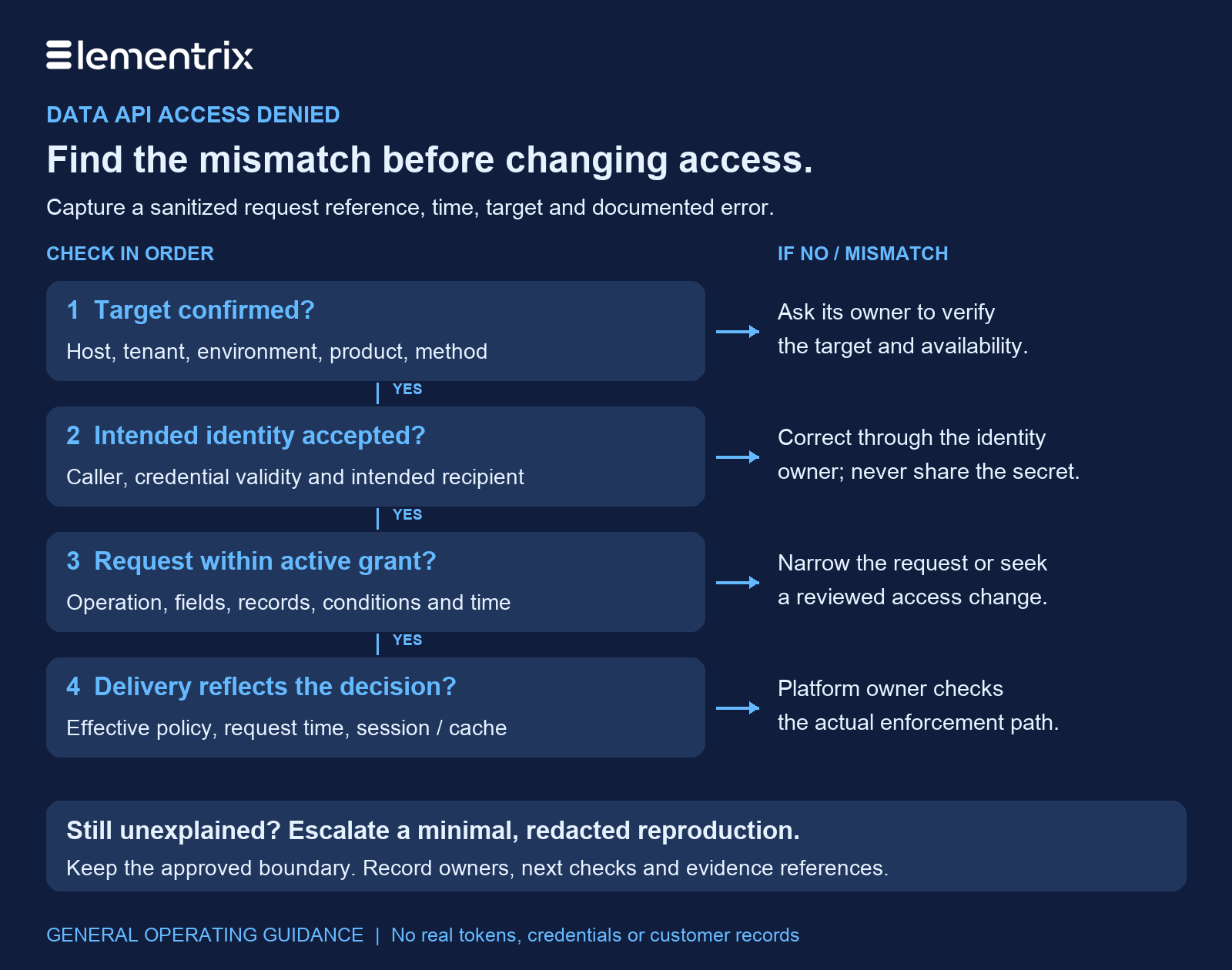
- Is the target confirmed? Check the host, tenant, environment, product version, path and method with an authorized owner. If the product is unavailable or retired, resolve that state first.
- Is the intended identity being evaluated? Confirm the workload identity and credential metadata through approved tooling. Correct missing, expired, revoked or incorrectly targeted credentials through the identity owner.
- Does the request fit an active grant? Compare operation, fields, record constraints and conditions. Narrow an overbroad request or submit a justified access change for approval.
- Does the delivery path reflect that decision? Correlate the actual request with the applicable policy version and session or cache state. Let the platform owner investigate inconsistencies.
- Still unexplained? Escalate a minimal, sanitized reproduction with evidence references and the checks already completed. Keep the failing request bounded while the owner investigates.
Check identity, credential validity and the target together
Confirm the caller, not just the person who approved access
A developer’s successful browser session does not establish what a background worker can do. Likewise, a human’s role in a management console may be separate from a workload’s permission to consume a data product. Compare the identity observed at enforcement with the identity named in the approval. Use the application-level and user-level access guide when those identities are being confused.
Look for configuration drift: the deployment might still reference an earlier credential version, a staging principal or a different tenant. Compare safe version references and approved identity labels rather than printing the secret. If several applications share an identity, record the attribution gap and involve their owners; do not assume one log entry identifies the responsible workload.
Use the authentication scheme’s own checks
For OAuth bearer tokens, RFC 6750 distinguishes invalid tokens from insufficient scope. Its guidance associates an invalid token with 401 and insufficient scope with 403. That does not establish the behavior of an API using another scheme. Check the issuer, intended recipient, validity window and required scope using the service’s supported diagnostics. Do not paste a bearer token into a public decoder or a support ticket.
If a credential has expired, use the approved renewal flow and retry only after a meaningful correction. Do not repeatedly send the same failing request, disable validation or rotate unrelated credentials. Rotation can affect dependent workloads and does not itself change their authorized scope.
Compare the exact request with its approved grant
An approval email is useful context, but the investigation needs the current grant on the resource and environment being called. Read the access-control overview for the broader model; use the following comparison to diagnose this particular request.
| Boundary | Evidence to compare | Safe next action |
|---|---|---|
| Resource and environment | Requested product/version and tenant against the grant target | Correct the client target; seek a separate approval if another environment is needed. |
| Operation | Method and action against the allowed operations | Use the approved operation or request a reviewed change. |
| Fields | Explicit selections, default expansion and nested properties against the allowed field set | Remove unnecessary fields. Check documented deny/filter behavior. |
| Records and context | Region, tenant, purpose and other applicable constraints | Keep the approved boundary; investigate why the request falls outside it. |
| Time and status | Request timestamp against grant activation, expiry and revocation evidence | Ask the owner to confirm current validity; do not infer activation from a saved form. |
A field restriction may reject the whole request, omit a property or use another documented representation. An empty result can also reflect a valid record filter. Establish the service’s intended behavior before calling either case a defect. The field-level security guide provides context for this narrower check.
For an approved, read-only diagnostic, simplify one dimension at a time: retain the same identity, environment and record boundary while requesting only permitted fields. Do not use an administrator token as a substitute. Avoid repeatedly executing writes or other actions with side effects while reproducing an incident.
Work through a synthetic field mismatch
Suppose Regional Router is approved to read customer_id, status and region from the Service Customer product in staging, for records within its assigned region. A client release adds email to its projection. The illustrative service is configured to reject requests containing an unapproved field, and the incident records a documented field-denial reason.
The support lead first confirms that the evaluated identity is Regional Router and the target is the approved staging product. The identity owner confirms credential validity through internal tooling. The grant comparison then identifies the extra field. Because routing does not need email, the proposed correction removes it from the request; it does not expand the grant.
Before closing, verify that the corrected read returns the expected permitted shape and stays within the assigned region. Also check that an unapproved field request still fails in the controlled test environment. These are proposed acceptance checks, not reported results. If email becomes a legitimate requirement later, handle that as a separately reviewed access change.
Capture safe evidence and escalate to the right owner
Keep the ticket useful without turning it into a credential store. OWASP’s logging guidance recommends excluding or appropriately protecting tokens, passwords and other sensitive values. Apply the same discipline to screenshots, command history, request exports and support attachments.
Use approved internal references for identity and grant records. Share only the minimum metadata the receiving team is authorized to see. Remove Authorization and Cookie values, API keys, signed query parameters, customer identifiers and returned records. Review error messages and endpoint paths too: they can disclose sensitive names or identifiers. A correlation ID is an evidence pointer, not permission to expose the underlying logs.
SYNTHETIC SUPPORT TICKET — no real secrets or records
Summary: Regional Router read denied after projection change
Time: 2026-10-29T08:55:00+03:00 (illustrative)
Environment / tenant: staging / synthetic-tenant
Product / version: Service Customer / v1
Method / path: GET /example/service-customer (illustrative)
Caller reference: Regional Router; internal identity record [restricted link]
Credential: value OMITTED; safe version reference [internal only]
Observed status / reason: copy actual documented values after redaction
Correlation reference: [restricted evidence link, if available]
Approved fields: customer_id, status, region
Requested fields: customer_id, status, region, email
Record boundary: assigned region; no customer values attached
Recent change: client projection added email
Checks completed: target, evaluated identity and active grant compared
Proposed correction: remove unneeded email; no grant expansion
Acceptance checks: permitted read succeeds; excluded-field request stays denied
Owner / next step: consumer owner corrects projection; platform owner verifies
Results: NOT EXECUTED — fill only after an authorized check
Route identity failures to the identity or workload owner, grant questions to the data owner and delivery inconsistencies to the platform operator. For a recent policy change, compare the decision’s effective time with the request timestamp, token or session lifetime and any documented propagation or caching behavior. Do not flush shared caches or revoke unrelated sessions without the responsible operator’s controlled plan.
Close the incident when the intended request works within its approved boundaries and the relevant exclusion checks still hold. Record the cause, accountable owner, correction and evidence references. If the boundary itself must change, use the normal access-management lifecycle rather than treating troubleshooting as approval.